Movaci
  • 0 Shopping Cart
  • Home
  • Store
    • Browse All
    • Movaci Secure Web Hosting
    • Movaci Secure Email
    • Movaci Exchange Services
    • Movaci SSL Certificates
    • Movaci NextCloud
    • Register a New Domain
    • Transfer Domains to Us
  • Announcements
  • Knowledgebase
  • Network Status
  • Affiliates
  • Contact Us
  • Policies
    • Acceptable Use Policy
    • Terms of Service
    • Privacy Policy
    • Service Level Agreement
  • More
  • Account
    • Login
    • Forgot Password?
  1. Portal Home
  2. Knowledgebase
  3. SafeNet NG VPN
  4. Change SafeNet NG VPN password from My.Movaci.com

  Categories

3rd Party Application Troubleshooting
2
Artificial Intelligence
1
Connect VoIP
2
Domain Registration, Migration, and Transfer
3
MAC OS
2
Microsoft
11
Mobile Device Management Service
2
MSP Platform
3
my.Movaci
10
Network & Internet
1
NextCloud
12
Password Management and Sharing
2
ProNet, SmartNet, MetroNet
2
Remote Desktop Services
4
Remote Support Assistance
1
SafeNet NG VPN
11
Secure E-mail
40
Secure Hosting
32
Security Advisory
2
Ubiquiti Devices
2
VPS Service
1
Windows Settings and Troubleshooting Tools
9

  Categories

  Tag Cloud

my.Movaci NVR Secure Email

  Support

My Support Tickets
Announcements
Knowledgebase
Downloads
Network Status
Open Ticket

Change SafeNet NG VPN password from My.Movaci.com Print

  • 0

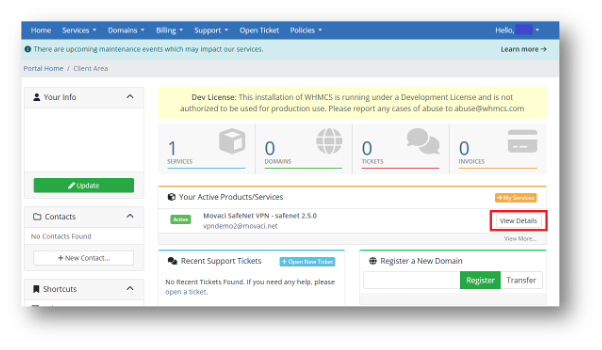
  1. Login to My.Movaci.com and under Your Active Products/Services, SafeNet NG VPN Product, click View Details to open your SafeNet NG VPN product.
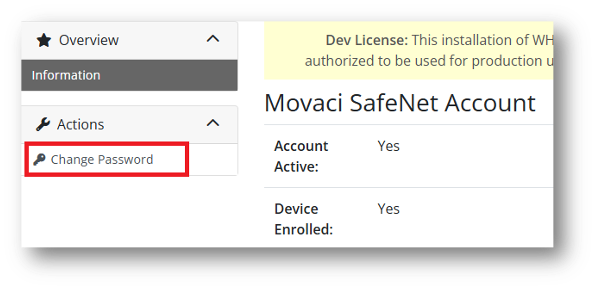
  2. Select Change Password from the left-hand menu.
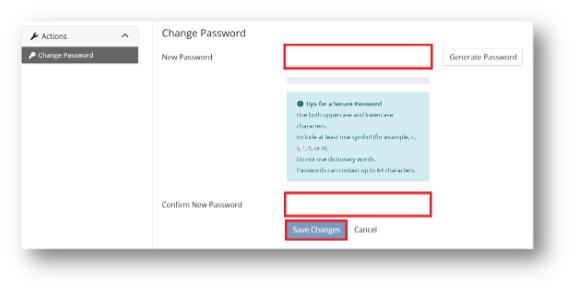
  3. Enter your new password and confirm your new password, then click Save Changes.
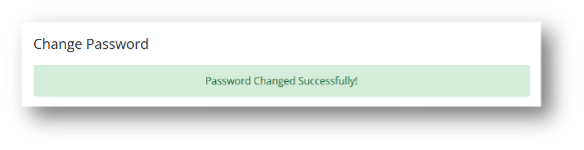
  4. A confirmation message, Password Changed Successfully will appear.


Was this answer helpful?

Related Articles

What is Movaci SafeNet NG VPN SafeNet NG (next gen) VPN is Movaci's secure virtual private network service powered by the... How to enroll in SafeNet NG VPN and Setup Desktop Device Prerequisites Required Information: Ensure you have received your SafeNet NG VPN enrollment... Setup SafeNet NG VPN on your mobile device **Important Note**:We recommend completing your first time enrollment first with your desktop... How to connect to SafeNet NG VPN Open your Defguard application. In the left-hand menu, select the VPN location you would like... SafeNet NG VPN Portal - What is it? The SafeNet NG VPN Portal allows you to manage your VPN account, enrolled devices, authentication...
« Back

  Tag Cloud

my.Movaci NVR Secure Email

  Support

My Support Tickets
Announcements
Knowledgebase
Downloads
Network Status
Open Ticket
  • Contact Us
  • Terms of Service

Copyright © 2026 Movaci. All Rights Reserved.


Loading...
Loading...

Choose Currency

฿ THB
$ USD
$ AUD

Generate Password

Please enter a number between 8 and 64 for the password length